



Hooking up 525 Smartcraft to Simrad NSS
 04-16-2017 | 04:55 PM
#1
Thread Starter
Registered
Joined: Oct 2014
Posts: 117
Likes: 0
From: SE Murder Mitten
 Hooking up 525 Smartcraft to Simrad NSS
Just as the title says, I am looking to hook up a pair of Merc 525s to a Simrad NSS unit. If twin engines, I would assume use Vessel View Link as the gateway, part #8M0110641. What else will be needed to hook this up correctly. Junction Blocks, Terminating resistors, wiring harnesses etc... part numbers would much appreciated.
Thanks in advance.
Thanks in advance.
 04-17-2017 | 10:28 AM
#2
Registered

Joined: Jun 2011
Posts: 2,169
Likes: 82
From: Henderson, KY
I'm in the process of considering something similar (but with Garmin). I believe all you need is the gateway.
https://embed.widencdn.net/pdf/plus/...R.pdf?u=orhjei
https://embed.widencdn.net/pdf/plus/...R.pdf?u=orhjei
04-17-2017 | 10:35 AM
#3
Registered

Joined: Jun 2010
Posts: 1,119
Likes: 2
From: Central IL / Green Bay, WI
Here's a quick schematic from when I installed a Vessel View 7 (NSS 7) in my boat last year.
I used to have a list of all the cable part numbers and such, but I can't seem to find it right now.
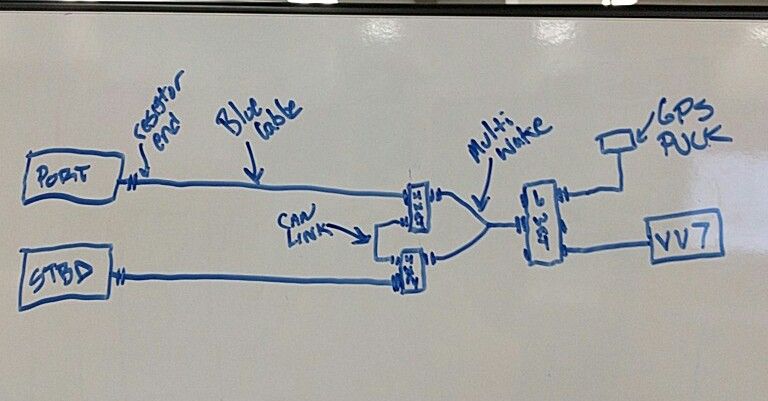
EDIT:
Found a couple more bits of info...wish I'd kept better track of this at the time, for future use. lol Hope this helps.
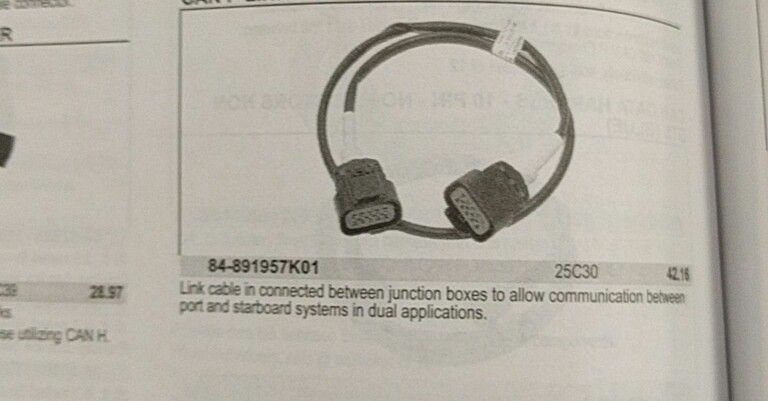
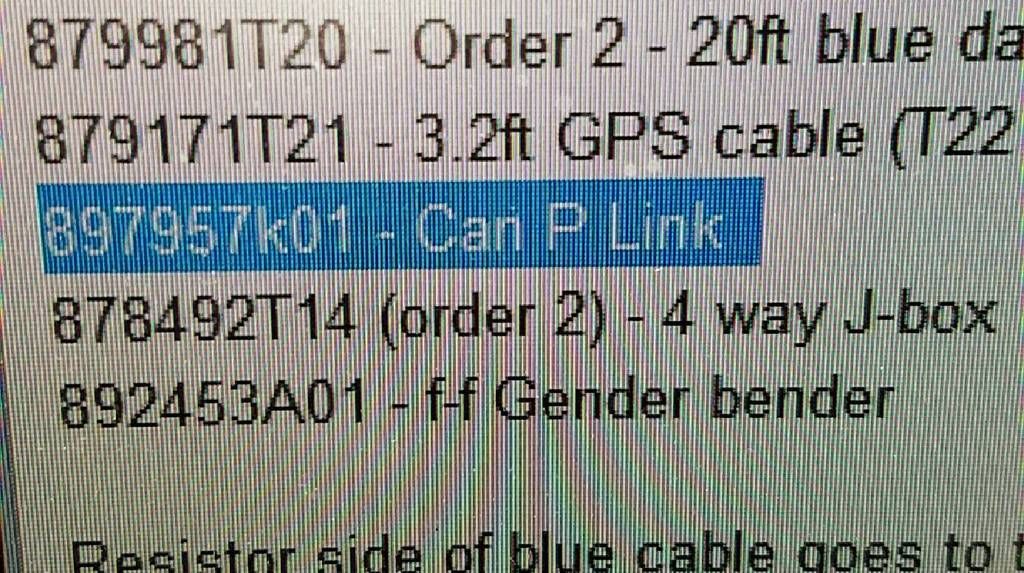
I used to have a list of all the cable part numbers and such, but I can't seem to find it right now.

EDIT:
Found a couple more bits of info...wish I'd kept better track of this at the time, for future use. lol Hope this helps.


Last edited by Wasted Income; 04-17-2017 at 10:54 AM.
04-17-2017 | 11:53 AM
#4
Registered
Joined: Dec 2007
Posts: 2,054
Likes: 12
From: Pompano Beach, FL
In order to get the information on the GPS whether it is a Simrad or Garmin you will need the mercury gateway yes and also set up a NMEA2000 backbone to hook up the mercury gateway to the units.
The NMEA2000 backbone needs to have power also.
The NMEA2000 backbone needs to have power also.
04-17-2017 | 12:36 PM
#5
Registered
Joined: Jun 2011
Posts: 2,169
Likes: 82
From: Henderson, KY
Right - I failed to make that point. I put in a powered backbone when I installed my Fusion headunit and remote.
Wasted - is the Link cable already present in stock form, or do you have to add that?
Wasted - is the Link cable already present in stock form, or do you have to add that?
04-17-2017 | 01:27 PM
#6
Registered
Joined: Jun 2010
Posts: 1,119
Likes: 2
From: Central IL / Green Bay, WI
The older VesselView 7 has the smartcraft gateway built in, so I didn't need to deal with any of that. However, i'm currently upgrading to a Vessel View 702 (NSS Evo2) and that unit uses the same 8M0110641 smartcraft gateway.
You will still need all the items between the 6 port junction box and the engines.
Last edited by Wasted Income; 04-17-2017 at 01:31 PM.
04-30-2017 | 02:49 PM
#7

Registered

Joined: Aug 2003
Posts: 183
Likes: 4
From: Austin, Texas
This question is directed to "wasted income" . Have you completed your upgrade to the 702? If so, are you getting a "rudder position/steering indicator" on your display screen? I completed an upgrade from the first generation "system view" to the VV502. It is the smaller display version of what you are using. I am not getting a "rudder position/steering indicator" display. The retail vendor and Mercruiser customer service have been of zero assistance. I posted a thread titled Vesselview 502 a while back. Thanks



 05-01-2017 | 12:07 PM
#10
Registered
Joined: Jun 2010
Posts: 1,119
Likes: 2
From: Central IL / Green Bay, WI
This question is directed to "wasted income" . Have you completed your upgrade to the 702? If so, are you getting a "rudder position/steering indicator" on your display screen? I completed an upgrade from the first generation "system view" to the VV502. It is the smaller display version of what you are using. I am not getting a "rudder position/steering indicator" display. The retail vendor and Mercruiser customer service have been of zero assistance. I posted a thread titled Vesselview 502 a while back. Thanks
I finished my install, but the boat hasn't been wet yet. I personally don't have or need the steering/rudder stuff, since to my knowledge, the 496/bravo package in my boat doesn't have those sensors.

