


W/F code
 06-20-2018 | 11:58 AM
#11
Thread Starter
Registered
Joined: Dec 2007
Posts: 114
Likes: 0
From: Long Island, NY
 06-20-2018 | 12:08 PM
#12
Banned
Joined: Jul 2011
Posts: 9,594
Likes: 46
From: Ft. Worth TX

keep in mind pressure is a form of resistance and at dead spot on idle MERC recommends 1 to 5 psi for water pressure .... IMO I think 5 psi and above is too high as possible form of a restriction spike for DEAD IDLE spot on RPM.
See with a restriction then comes reduce water flow hence if you have the water flow kit installed from whom ever or it is not deactive without being installed or someone took it out of the mix because it failed or whatever --- then possible why you have a WF fault code. I really do like the water flow sensor reading when they are working properly.
Keep in mind I do NOT know nor seen your exact set up and its NOT stock so many things have changed in the mix. STOCK OEM MERC does not come with a water flow sensor but YES it does come with a installed water pressure sensor.for all PCM 555 and ECM 555 stock apps
See with a restriction then comes reduce water flow hence if you have the water flow kit installed from whom ever or it is not deactive without being installed or someone took it out of the mix because it failed or whatever --- then possible why you have a WF fault code. I really do like the water flow sensor reading when they are working properly.
Keep in mind I do NOT know nor seen your exact set up and its NOT stock so many things have changed in the mix. STOCK OEM MERC does not come with a water flow sensor but YES it does come with a installed water pressure sensor.for all PCM 555 and ECM 555 stock apps
Last edited by BUP; 06-20-2018 at 12:48 PM.
06-20-2018 | 12:15 PM
#13
Thread Starter
Registered
Joined: Dec 2007
Posts: 114
Likes: 0
From: Long Island, NY
keep in mind pressure is a form of resistance and at dead spot on idle MERC recommends 1 to 5 psi for water pressure .... IMO I think 5 psi and above is too high as possible form of a restriction spike for DEAD IDLE spot on RPM.
See with a restriction then comes reduce water flow hence if you have the water flow kit installed from whom ever or it is not deactive without being installed or was tsomeone took it out of the mix because it failed --- then possible why you have a WF fault code. I really do like the water flow sensor reading when they are working properly.
Keep in mind I do NOT know nor seen your exact set up and its NOT stock so many things have changed in the mix. STOCK OEM MERC does not come with a water flow sensor but YES it does come with a installed water pressure sensor.for all PCM 555 and ECM 555 stock apps
See with a restriction then comes reduce water flow hence if you have the water flow kit installed from whom ever or it is not deactive without being installed or was tsomeone took it out of the mix because it failed --- then possible why you have a WF fault code. I really do like the water flow sensor reading when they are working properly.
Keep in mind I do NOT know nor seen your exact set up and its NOT stock so many things have changed in the mix. STOCK OEM MERC does not come with a water flow sensor but YES it does come with a installed water pressure sensor.for all PCM 555 and ECM 555 stock apps
06-20-2018 | 10:32 PM
#14
Banned
Joined: Jul 2011
Posts: 9,594
Likes: 46
From: Ft. Worth TX
On your Livorsi gauge for one is smartcraft compatible being a 496 -- it just hit me that what you are seeing --- ICONs reading --- W and F --- are they blinking ?
Anyways these icons are not a pin point fault code but they are ICONS to warn that you have a warning = ( Warning indicator SMARTCRAFT only apps ) that is the W part of your display on the gauge.
And the F is a display warning for ( Fault Warning Indicator ) meaning that a fault code was set.
that is your WF ----- ICON display
you will need to scan the engine and hopefully have knowledge base of the recal in your PCM - what possible might be turned off and left on along with recalibrated parameters . Overspeed warning would be MY FIRST GUESS for the WF icons display on your livorsi gauge plus possible other warnings ??? Keep in mind throwing out my best guess without seeing this in person. Overspeed IMO would be a real guess and or in the mix.
Anyways these icons are not a pin point fault code but they are ICONS to warn that you have a warning = ( Warning indicator SMARTCRAFT only apps ) that is the W part of your display on the gauge.
And the F is a display warning for ( Fault Warning Indicator ) meaning that a fault code was set.
that is your WF ----- ICON display
you will need to scan the engine and hopefully have knowledge base of the recal in your PCM - what possible might be turned off and left on along with recalibrated parameters . Overspeed warning would be MY FIRST GUESS for the WF icons display on your livorsi gauge plus possible other warnings ??? Keep in mind throwing out my best guess without seeing this in person. Overspeed IMO would be a real guess and or in the mix.
Last edited by BUP; 06-20-2018 at 10:35 PM.
06-21-2018 | 01:54 AM
#15
Registered

Joined: Nov 2010
Posts: 284
Likes: 3
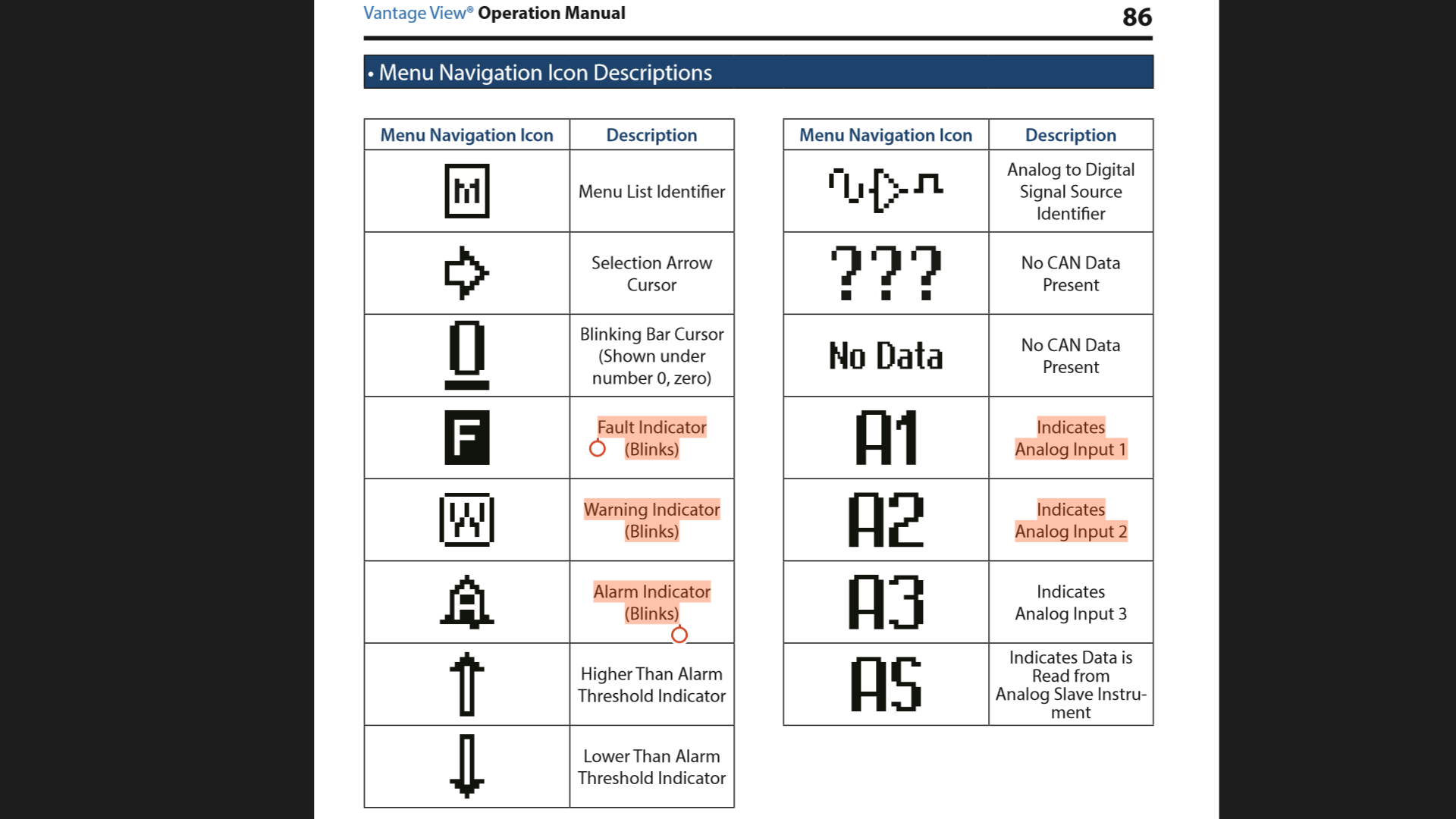
+1 with Bup's theory of the WF code just being a general warning type indication icon and not really a specific code such as water flow, water in fuel, Washer Fluid Level, etc. due to not really seeing an actual code for WF in one of livorsi's user guide manuals for their gauges like the screenshot above/or near the bottom of the following manual link....., http://www.livorsi.com/pdf/vantage/l...structions.pdf
If it was water flow then you'd probably have something more of the design type gauge in the following link installed too though this system does connect to the tachometer to monitor engine RPM for the Raw Water Flow System by, http://www.livorsi.com/catalog/water_flow.html and does offer an optional audible warning horn system.
An engine scan should be needed to help pinpoint why you're getting an WF type icon.
06-21-2018 | 10:54 AM
#16
Banned
Joined: Jul 2011
Posts: 9,594
Likes: 46
From: Ft. Worth TX
^^^^ have no idea how some of you guys find this stuff online but that looks like I was exactly spot in post 14. ---- The problem is I have to think about all of it first , then put it all into words. Jeez there it is written in the owners manual without even thinking about it. . Wished I found that first the owners manual. Anyways still all good info including post #14. -- The next step --- Need to pin point the fault(s) and possible overspeed fault will be in the mix.
Not the OP issue for a WF code so added info on top of ---- Back to the water flow sensor and output ---- there is actually many that read thru the ecm / pcm to set faults for water flow.. Some will use the mechanical set ups but also some use the digital set ups as they will fall under discrete switch in the ECM / PCM. Indmar has an airman water flow reading and can be faulted in returned fault coded when the parameters fall out of range, Then of course scanned to verify the fault(s). IMO water flow is a good parameter to have set up in your app. If it can stay working properly Just saying.
Not the OP issue for a WF code so added info on top of ---- Back to the water flow sensor and output ---- there is actually many that read thru the ecm / pcm to set faults for water flow.. Some will use the mechanical set ups but also some use the digital set ups as they will fall under discrete switch in the ECM / PCM. Indmar has an airman water flow reading and can be faulted in returned fault coded when the parameters fall out of range, Then of course scanned to verify the fault(s). IMO water flow is a good parameter to have set up in your app. If it can stay working properly Just saying.


