


Post pics of your family and pets

 04-03-2002 | 03:32 PM
#12
Platinum Member


Joined: Jun 2001
Posts: 21,346
Likes: 10

Hey Steve,
If you can scan the pic and save it, you're half-way there!
Once this is complete, open up the picture in most any photo editor. If you have "MS Photo Editor" that's prefered as that's all I have to demonstrate on right now. Click on "Image" in the menu bar at the top and then select "Resize." When the little window pops up change the "units" selection to "pixels." Now resize the pic so that it is smaller than 640X480 pixels so OSO will accept it. That's it! Now save it or "Save as" with a new name-up to you- so you don't overwrite the original.
Now simply come back here and post a reply. Under the area that you type the messages there's a section in grey called "attach file." Click on the "Browse" button and search for the pic you created. Done!

If you can scan the pic and save it, you're half-way there!
Once this is complete, open up the picture in most any photo editor. If you have "MS Photo Editor" that's prefered as that's all I have to demonstrate on right now. Click on "Image" in the menu bar at the top and then select "Resize." When the little window pops up change the "units" selection to "pixels." Now resize the pic so that it is smaller than 640X480 pixels so OSO will accept it. That's it! Now save it or "Save as" with a new name-up to you- so you don't overwrite the original.
Now simply come back here and post a reply. Under the area that you type the messages there's a section in grey called "attach file." Click on the "Browse" button and search for the pic you created. Done!
04-04-2002 | 07:54 AM
#15
Platinum Member
Joined: Jun 2001
Posts: 21,346
Likes: 10
Hey Steve,
First off, did you in fact use MS Photo Editor? If yes great!, If no then see if there are similar functions. Most programs are basically the same.
See attached image. Use the function I have indicated in the circle. Use that to box around the area of the picture that you would like to keep. When the desired area is highlighted, right-click with the mouse and a little menu window will appear. Select the "crop" function. This will eliminate everything outside the area you selected. Then save it! Good luck!
First off, did you in fact use MS Photo Editor? If yes great!, If no then see if there are similar functions. Most programs are basically the same.
See attached image. Use the function I have indicated in the circle. Use that to box around the area of the picture that you would like to keep. When the desired area is highlighted, right-click with the mouse and a little menu window will appear. Select the "crop" function. This will eliminate everything outside the area you selected. Then save it! Good luck!
 04-04-2002 | 10:25 AM
#19
Senior Member # 68
Joined: Oct 2000
Posts: 323
Likes: 0
From: Niles Mi. USA
Nick,
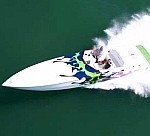
Yea,that was on my 36 last summer on Lake Mi.
Can't wait to get the boat out and start getting it ready for summer.I was planning on dewinterizing it April1st but as of today it's still snowing like a *****
Thanks again for the help,I owe ya one.
Steve
Yea,that was on my 36 last summer on Lake Mi.
Can't wait to get the boat out and start getting it ready for summer.I was planning on dewinterizing it April1st but as of today it's still snowing like a *****
Thanks again for the help,I owe ya one.
Steve

